Know what actually drives your mood.
Most mood trackers hand you a chart and call it a day. MoodKit studies your own check-ins and tells you, plainly, which activities lift you up, which drag you down, and what to try next.



- Entries to first insight
- 3
- Activities to tag
- 24
- Insight tiers
- 4
- Languages
- 11
Mood to Meaning
in Seconds
A three-step check-in that takes seconds but reveals patterns that last.
Check In
Pick from five moods with one tap, or create your own with any emoji, label, and color.
Tag Activities
24 built-in activities plus any custom ones you like. This is how MoodKit connects what you do to how you feel.
Add a Note
"Had a great morning run, feeling energized and focused..."
Add a short note if you want, and log as many times a day as you need.
Private by Design
Your entries stay on your device. Optional private iCloud sync, Face ID app lock, and no account — ever.
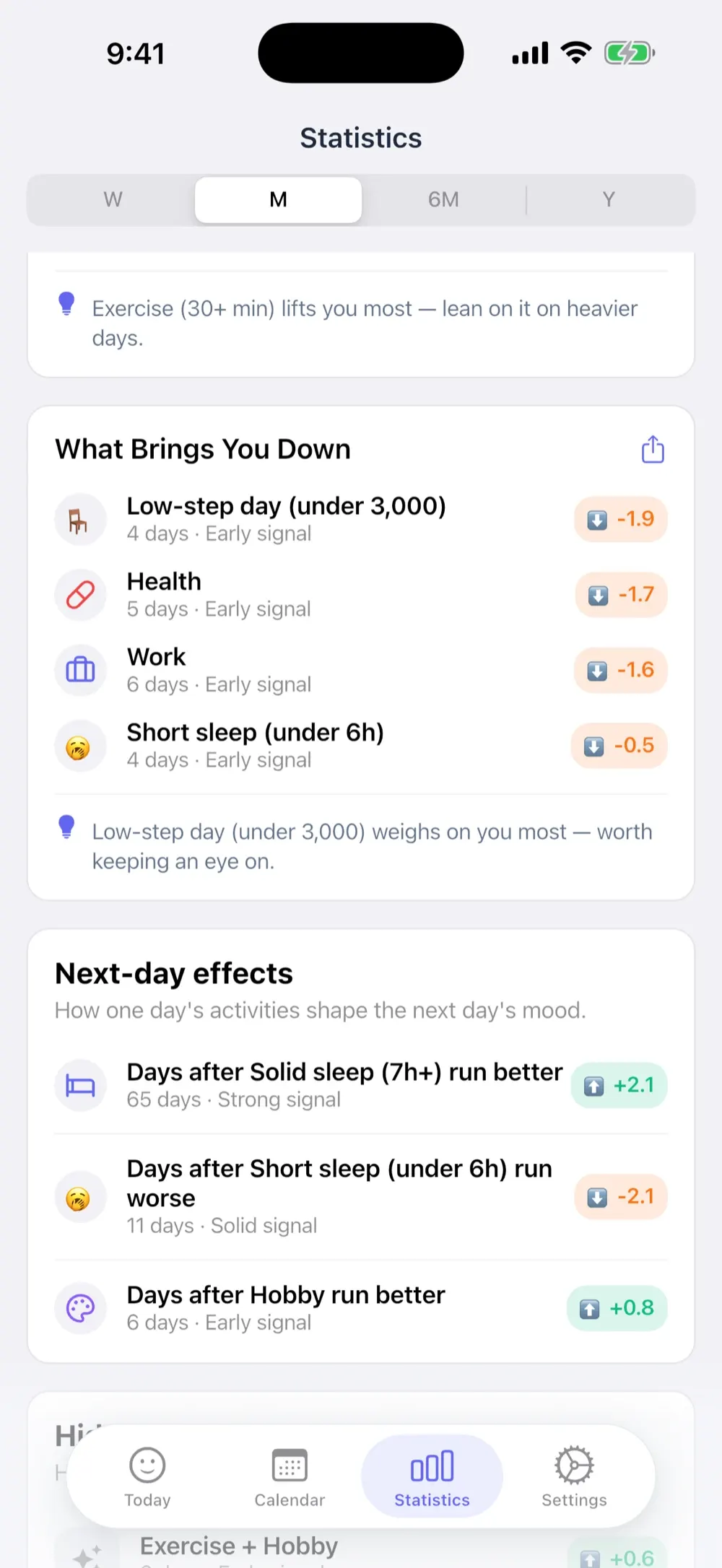
See what lifts you up and what drags you down
Your activities, ranked by their measured effect on your mood — with the size of each effect and how many days back it, so you know which patterns to trust.
- Activities ranked by measured impact, not by how often you log them
- Hidden Patterns finds combinations you'd never spot on your own
- Weekly Rhythms surfaces the day-of-week patterns shaping your weeks

Put it to the test for a week
Try a habit for seven days, skip one to see if it was dragging you down, or test whether a late night hurts tomorrow — then get an honest verdict from your own data.
- Three kinds: try it, skip it, or measure the day after
- A seven-day window compared against your own 30-day baseline
- Says “not enough data” when that is the honest answer

Your health, connected automatically
Last night's sleep, your exercise and your daily steps rank right alongside the activities you tag — no extra logging required.
- Sleep, exercise and steps become first-class mood factors
- Save check-ins to Apple Health as State of Mind entries (iOS 18)
- Optional and off by default — your health data stays on your device

Log in a tap, right from your Home Screen
Today's mood and streak, your last seven days, or a full Year in Pixels — checked and logged without ever opening the app.
- Home Screen widgets in three sizes, plus a Lock Screen widget
- One-tap logging straight from a widget or a reminder notification
- Widgets follow whichever icon style you have picked

Insights That
Grow With You
A four-tier insight engine that unlocks as you log. You get something useful on day one, and more as your history builds.
Instant Feedback
Instant feedback on your moods and activities at 3 entries.
Early Patterns
Early patterns, like your best and worst weekdays, at 7 entries.
Deep Insights
Root causes, emotional ROI and activity combos at 14 entries.
Full Intelligence
Monthly comparisons, catalysts and triggers at 30 entries.
No AI.
Just your data.
MoodKit never sends your feelings to a chatbot. Every insight is honest statistics computed right on your device — no cloud analysis, no black box. You can always see why MoodKit says what it says.
See the Full Picture
Everything else you get, once the habit sticks.
Year in Pixels
Twelve months of moods in one color grid — on screen, and as a Home Screen widget.
Calendar
Mood-colored days, a daily timeline, activity filters, and monthly snapshots.
Streak Freezes
Banked freezes so one busy day doesn't erase your progress — plus a gentle evening heads-up.
30 Achievements
Thirty achievements that reward showing up, not perfection.
Icon Styles
Restyle every mood and activity in 3D, flat, or outline — widgets follow along.
Export & Backup
CSV for spreadsheets, or a full JSON backup you can restore anytime.
Private by Design
Your mood entries, notes and tags never leave your device — except to your own iCloud, or an export you choose to take. Like most apps, MoodKit uses standard analytics and crash reporting to keep itself working; that data is about the app, never about how you feel.
- No account, no sign-up, ever
- Works fully offline
- Optional private iCloud sync across your devices
- Face ID / Touch ID app lock
Frequently Asked
Questions
What is MoodKit?
MoodKit is a mood tracker for iPhone and iPad that tells you what actually drives your mood. You check in with one tap, tag what you were doing, and MoodKit's Life Intelligence engine surfaces which activities lift you up, which drag you down, and what to try next.
How does mood tracking work in MoodKit?
It is a three-step check-in. Pick one of five moods, or create your own with any emoji, label, and color. Tag what you were doing from 24 built-in activities plus any custom ones you add. Then optionally add a short note. You can log as many times a day as you need.
What is Life Intelligence?
Life Intelligence is MoodKit's four-tier insight engine, and it unlocks as you log. At 3 entries you get instant feedback on your moods and activities. At 7, early patterns such as your best and worst weekdays. At 14, root causes, emotional ROI, and activity combos that work well together. At 30, monthly comparisons, streak stats, and your personal catalysts and triggers.
Does MoodKit use AI?
No. MoodKit never sends your feelings to a chatbot. Every insight is honest statistics computed right on your device — no AI, no cloud analysis, no black box. You can always see why MoodKit says what it says.
Does MoodKit work with Apple Health?
Yes, and it is optional and off by default. When you turn it on, MoodKit reads your sleep, exercise, and steps so they rank alongside the activities you tag. It can also save your check-ins to Apple Health as State of Mind entries on iOS 18. Your health data stays on your device.
Is MoodKit free?
MoodKit is free to download and comes with a free trial that opens up every Premium feature. No account and no credit card are needed to start. After the trial you can subscribe, or pay once with the Lifetime option.
How does MoodKit protect my privacy?
Your mood entries, notes, and tags stay on your device. There is no MoodKit account and no MoodKit server, and the app works fully offline. iCloud sync is optional and goes to your own private iCloud. A Face ID or Touch ID app lock keeps the app closed to everyone else. Like most apps, MoodKit uses standard analytics and crash reporting to keep itself working; that data is about the app, never about how you feel.
Can I export my mood data?
Yes. MoodKit exports CSV for spreadsheets like Excel or Google Sheets, and takes a full JSON backup you can restore at any time. Your data is always yours to take with you.
What devices and iOS version does MoodKit require?
MoodKit runs on iPhone and iPad with iOS 15 or later. Home Screen and Lock Screen widgets require iOS 17, and saving check-ins to Apple Health as State of Mind entries requires iOS 18.
3 Entries Unlock
Your First Insights
Your moods already have patterns. Start with one check-in — by your 3rd entry Life Intelligence kicks in, and by your 30th you'll have the complete picture.
Free trial, or pay once with Lifetime • iPhone & iPad • iOS 15+